
"Search Engine Journal" -
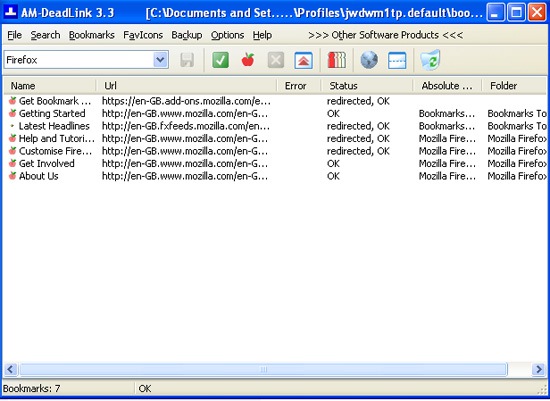
Advanced Ways to Make Sense of Your FireFox BookmarksWe consume so much info on the web that it is absolutely impossible to do without some smart bookmarking tools.FireFox built-in bookmarking feature is one way to go: the browser bookmarks can now be organized by folders and tags and they are always by hand. And what’s more, there are a few addons and tools that help make sense of them: Delete Dead BookmarksWhat is not good about FireFox bookmarks is that it is easy to lose control over them (well, that’s the problem with any bookmarking tool). One day you turn out to have hundreds of saved links: you have no idea what some of them stand for and why you have saved them. And what’s worse, plenty of them are not valid any more and they just add a lot of mess.Luckily, here’s one handy tool to help you filter out those useless and dead links: AM-DeadLink (compatible with FireFox and Internet Explorer). AM-DeadLink is a free desktop utility that detects dead links and duplicates in browser bookmarks and text files. If a bookmark has become unavailable you can verify and delete it permanently. Additionally you can download FavIcons for all your Favorites and Bookmarks.
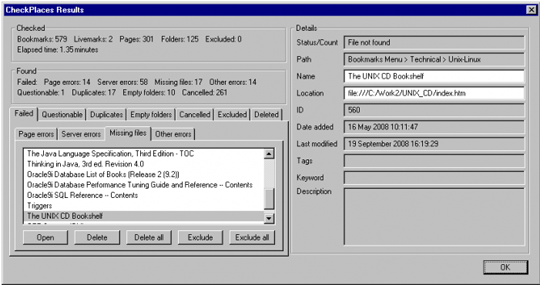
 An alternative tool for that: CheckPlaces (FireFox addon) that does basic check of your bookmarks, with the following options:
 Synchronize BookmarksXmarks started as a simple FireFox bookmarks synchronizer and later got another cool feature: Google SERPs assistant (shows which pages in your Google SERPs was favorited by many tool users).Keep in mind that your bookmarks will be stored online, so mind your privacy. The good thing is that you can access them from any computer: 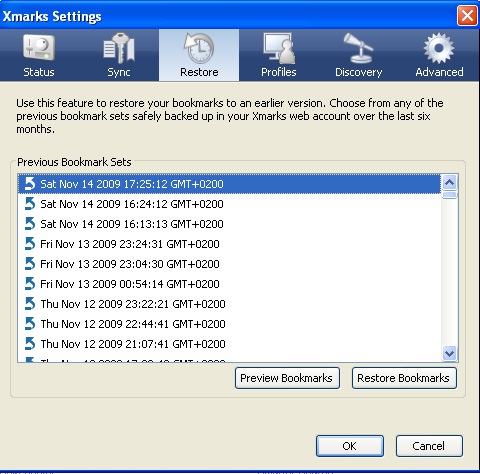 Optimize BookmarksSmart Bookmarks Bar (a handy Bookmarks toolbar optimizer) – It hides bookmarks names and only shows icons.Bookmark names will be displayed on mouse over. Well, despite the fact that I mostly have folders in my bookmarks toolbar, this still proves really useful as I can clearly remember which folder stands for what info, and besides I can see details on hover over:  Move BookmarksThe following addons allow to access bookmarks from alternative places:Context Bookmarks: Adds bookmarks to context menu so you can access them by mouse right click. All-in-One Sidebar: Loads bookmarks in the sidebar. If you are using any advanced hacks to manage and organize your FireFox bookmarks, let us know! Check out the SEO Tools guide at Search Engine Journal. Advanced Ways to Make Sense of Your FireFox Bookmarks More Recent Articles |
Monday, July 12, 2010
Search Engine Journal - Advanced Ways to Make Sense of Your FireFox Bookmarks


Thursday, June 24, 2010
Google News
(Cross-posted from the YouTube Blog) This is an important victory not just for us, but also for the billions of people around the world who use the web to communicate and share experiences with each other. We're excited about this decision and look forward to renewing our focus on supporting the incredible variety of ideas and expression that billions of people post and watch on YouTube every day around the world. UPDATE 2:12PM: This decision also applies to other parties to the lawsuit, including the Premier League.      |
Today, Verizon and Motorola announced the newest device powered by Android at an event in New York. We were thrilled to be there, and humbled by what our partners have been able to accomplish with Android. Every day 160,000 Android-powered devices are activated -- that's nearly two devices every second, used for the first time by people from New York to New Zealand. Android started with one simple idea: Provide a powerful, open mobile platform to drive faster innovation for the benefit of consumers. This idea has come to life around the world. Today, there are 60 compatible Android devices, delivered via a global partnership network of 21 OEMs and 59 carriers in 49 countries. The volume and variety of Android devices continues to exceed even our most optimistic expectations. In some instances, Android devices are selling faster than they can be manufactured. To celebrate, we are open-sourcing the new 2.2 version of Android, which we call Froyo, to our partners who manufacture Android devices around the world. Customers will enjoy great new features and improved browser performance. And developers will benefit from new tools such as Android cloud-to-device messaging (which makes it easier for mobile applications to sync data). We want to thank our partners for joining us in our vision, for creating such compelling devices, and for continuing to push the limits of what is possible in a smartphone.     |
Wednesday, June 23, 2010
SEO Your YouTube Channel to Bring New Business
- Magnets to the masses: "attracting" customers to your business with YouTube
- GoogleServe 2010: Celebrating community service worldwide
- Google Voice for everyone
- Vote for the international “I love football” Doodle 4 Google winner
Posted: 23 Jun 2010 09:30 AM PDT This post is the latest in our Small Business series about entrepreneurship and the various Google tools you can use to establish and improve your business presence on the Internet. Here, you'll learn how, with only a digital camera and a small budget, you can use YouTube to drive sales and engage your potential customers. -Ed. When you go to YouTube, you often see ads from big brand advertisers—a homepage ad or a display campaign running across the site. But many small business owners also use YouTube to reach their customers with videos about their products and services. While there are lots of different types of ads that small businesses can run on YouTube, sometimes the best way to show off your brand or product is to simply create a great video. Terrence Kelleman, founder of Dynomighty Design, has made YouTube videos the centerpiece of his company's marketing strategy, so I've invited him to share his thoughts about how he grew his business using YouTube. In 2001, I was working my day job as a digital photographer for e-commerce at The Museum of Modern Art (MoMA) when I found several prototypes for a product that were being thrown out. The plastic elements had magnets inside them, and as I broke them open and put the magnets on my desk, they suddenly shot together to form a straight line. Playing with the magnets, I realized I could make jewelry that was held together by magnetic force alone. This chance discovery was the first step on the road to starting my own company, Dynomighty, which sells magnetic jewelry and other creative products.  Terrence (back left, in blue shirt) and the Dynomighty team     |
Posted: 22 Jun 2010 12:00 PM PDT This month, Googlers around the world participated in GoogleServe—an annual event in which Google employees take a break from their day jobs to re-connect with local communities and give back through service projects. Over 6,000 Googlers from 65 offices in 27 countries spent time in activities ranging from helping the elderly get online and consulting with organizations on their social-media strategies to tidying up public parks and playing with dogs waiting to be rehomed. GoogleServe began in 2008 as an employee-driven initiative and is organized almost entirely by volunteers. For the 2010 event, we partnered with hundreds of community organizations, schools and governments to help meet local needs around the world. Here's a taste of some of this year's projects:
    |
Posted: 22 Jun 2010 10:53 AM PDT (Cross-posted from the Google Voice Blog) A little over a year ago, we released an early preview of Google Voice, our web-based platform for managing your communications. We introduced one number to ring all your phones, voicemail that works like email, free calls and text messages to the U.S. and Canada, low-priced international calls and more—the only catch was you had to request and receive an invite to try it out. Today, after lots of testing and tweaking, we're excited to open up Google Voice to the public, no invitation required. Over the past year, we've introduced a mobile web app, an integrated voicemail player in Gmail, the ability to use Google Voice with your existing number and more. Over a million of you are now actively using Google Voice, and many of the features released over the past year (like SMS to email and our Chrome extension) came as a result of your suggestions, so thanks! If you haven't yet tried Google Voice, we can't wait for you to try it out and let us know what you think. Check out our revamped features page to learn about everything Google Voice can do, and if you haven't seen it yet, this video provides a good overview in less than two minutes: We're proud of the progress we've made with Google Voice over the last few years, and we're still just scratching the surface of what's possible when you combine your regular phone service with the latest web technology. It's even more amazing to think about how far communication has come over the last couple hundred years. To put things in context, we created this infographic to visualize some recent history of human communication and how Google Voice uses the web to help people communicate in more ways than ever before (click the image for a larger version):  Update 10:53AM: Just to clarify, though we've opened up sign-ups, Google Voice is still limited to everyone in the U.S. for now.     |
Posted: 22 Jun 2010 08:44 AM PDT In April, we invited young artists in 17 countries to create a Google doodle based on the theme "I love football." Since then, more than 35,000 children in Australia, Germany, Ghana, South Korea, New Zealand, South Africa, United Kingdom, the Netherlands, Spain, Italy, France, Hong Kong, Taiwan, Czech Republic, Kenya, UAE and Israel have created original designs for this first-ever international doodling competition.  From footballs to goalposts, we saw some truly creative designs that prove just how much you can do with an "l," an "e," and a couple "o's" and "g's." In the past two weeks, the winner of each country's competition had their design shown on their country's homepage for a day. Now, we need help deciding which of these top doodlers' artwork will be featured on the Google homepage of all 17 participating countries on July 11. You can vote for the international winner from June 21 until June 28—visit this site to weigh in. The winning doodler will receive a trip to South Africa for themselves and their family, offered by the South Africa Tourism Board. And the runner-up will win two VIP tickets to a Premiere League football match in the U.K. offered by Sports New Media. So whether you're an art lover or a football lover—vote for your favorite doodle today!     |
Subscribe to:
Posts (Atom)

